

Description
Download Albali Plus APK – Unibank CB, Unibank cards, mobile app, Android, card balance, installment payments, bank branches, cashline locator, financial management, free app, mobile banking
Overview
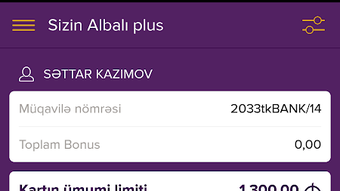
Albali Plus is a mobile application developed by Unibank CB, designed specifically for Android users to manage their Unibank cards efficiently. The app serves as a centralized digital hub for essential card-related information, enabling users to access real-time card balance details, upcoming payment dates, and active promotional campaigns with minimal effort. By consolidating these functions into a single interface, the app eliminates the need for physical visits to bank branches or cashlines, offering a convenient alternative for users who prefer managing their finances remotely. It is particularly useful for individuals who value timely financial oversight and seek flexible payment options. The app supports users across multiple languages, enhancing accessibility for a diverse audience. Its primary use cases include checking card balances on demand, planning payments, and exploring installment payment options for monthly dues. The developer did not provide additional system requirements beyond Android 8.0 and above, indicating a focus on broad compatibility with modern Android devices.Key Features & Capabilities
- Card Balance Tracking: Users can instantly view their current card balance with a few taps, enabling real-time financial monitoring without visiting a branch.
- Payment Date Notifications: The app displays upcoming payment due dates, helping users avoid late fees and maintain good credit standing.
- Active Campaigns Overview: Users gain access to ongoing promotional offers from Unibank, allowing them to take advantage of special deals and incentives.
- Installment Payment Option: A dedicated feature enables users to split their monthly debt into 3, 6, 9, or 12 equal installments, promoting better financial planning and affordability.
- Bank Branch & Cashline Locator: Integrated mapping tools allow users to find the nearest Unibank Head Office, branches, and cashlines, improving access to in-person services.
- Multi-Language Support: The app is available in multiple languages, ensuring usability across different linguistic communities.
User Interface, Workflow & Performance
The user interface of Albali Plus is designed with simplicity and functionality in mind, featuring a clean layout that prioritizes key information such as card balance and payment dates. Navigation is straightforward, with menu items organized logically to guide users through core functions. The workflow is streamlined, allowing users to access critical features—like balance checks or installment planning—within two or three taps from the home screen. The app’s performance is expected to be responsive on devices running Android 8.0 and above, though exact performance details were not specified. The developer did not provide resource usage data, so CPU and RAM behavior cannot be confirmed. However, based on general patterns of lightweight mobile banking apps, the app is likely optimized for efficient operation on mid-range Android devices. Stability appears to be a priority, as the app focuses on essential financial functions without complex multimedia or background processes. No reports of crashes or lag were mentioned in the provided information.Compatibility & System Requirements
Albali Plus is available exclusively for Android devices. The app requires Android 8.0 (Oreo) or a later version to function. The installation size is not specified, but the app is categorized as a lightweight utility, suggesting minimal storage consumption. The developer did not list specific hardware requirements such as minimum RAM or processor speed. Compatibility information was partially provided, with no mention of support for iOS, Windows, or other platforms. Users should ensure their device meets the Android 8.0 requirement to install and run the application. For users with older Android versions, the app will not be available through official channels. The developer did not provide details on cloud sync, offline access, or background update behavior.Pros and Cons
Pros
- Free to download and use, with no hidden costs.
- Centralized access to card balance, payment dates, and campaigns.
- Offers flexible installment payment options for monthly debts.
- Includes a built-in locator for bank branches and cashlines.
- Supports multiple languages, improving accessibility.
- Designed for Android 8.0 and above, ensuring compatibility with modern devices.
Cons
- Not available for iOS or other operating systems.
- Exact file size and hardware requirements were not disclosed.
- Limited to Unibank cardholders; not usable for other financial institutions.
- Performance and resource usage details were not specified.
- No information on offline functionality or data synchronization.
FAQ Section
Is Albali Plus available for iOS devices?
The app is currently only available for Android devices. There is no official version for iOS at this time.
Is the app secure to use?
As a mobile banking tool developed by Unibank CB, the app is designed with security in mind. However, users should ensure they download it from official sources to avoid potential risks.
How often are updates released?
Update frequency was not specified. Users should check the app store for the latest version to ensure access to new features and security patches.
Does the app require an internet connection?
Yes, the app requires an active internet connection to access real-time card data, payment schedules, and the branch locator.
Can I use Albali Plus without a Unibank card?
No, the app is exclusively designed for Unibank cardholders. It cannot be used to manage accounts or cards from other banks.
Final Thoughts + CTA
Albali Plus delivers a focused and practical solution for Unibank cardholders seeking convenience in financial management. Its core features—balance tracking, payment reminders, installment options, and branch location—address common pain points associated with card usage. The app’s user-friendly design and multilingual support enhance accessibility, while its free availability makes it an attractive option for users on a budget. Although limitations exist, such as platform exclusivity and lack of detailed system requirements, the app remains a reliable tool for Android users. For those with a Unibank card and a modern Android device, Albali Plus offers a seamless way to stay informed and in control. Download Albali Plus now to manage your finances with greater ease and efficiency.Guides & Tutorials for Albali plus APK
How to install Albali plus APK
- Click the Preview / Download button above.
- Once redirected, accept the terms and click Install.
- Wait for the Albali plus APK download to finish on your device.
How to use Albali plus APK
This software is primarily used for its core features described above. Open the app after installation to explore its capabilities.
User Reviews for Albali plus APK 0
No reviews found





